Inside the Global Data Cloud: What Our Data Centers Really Store

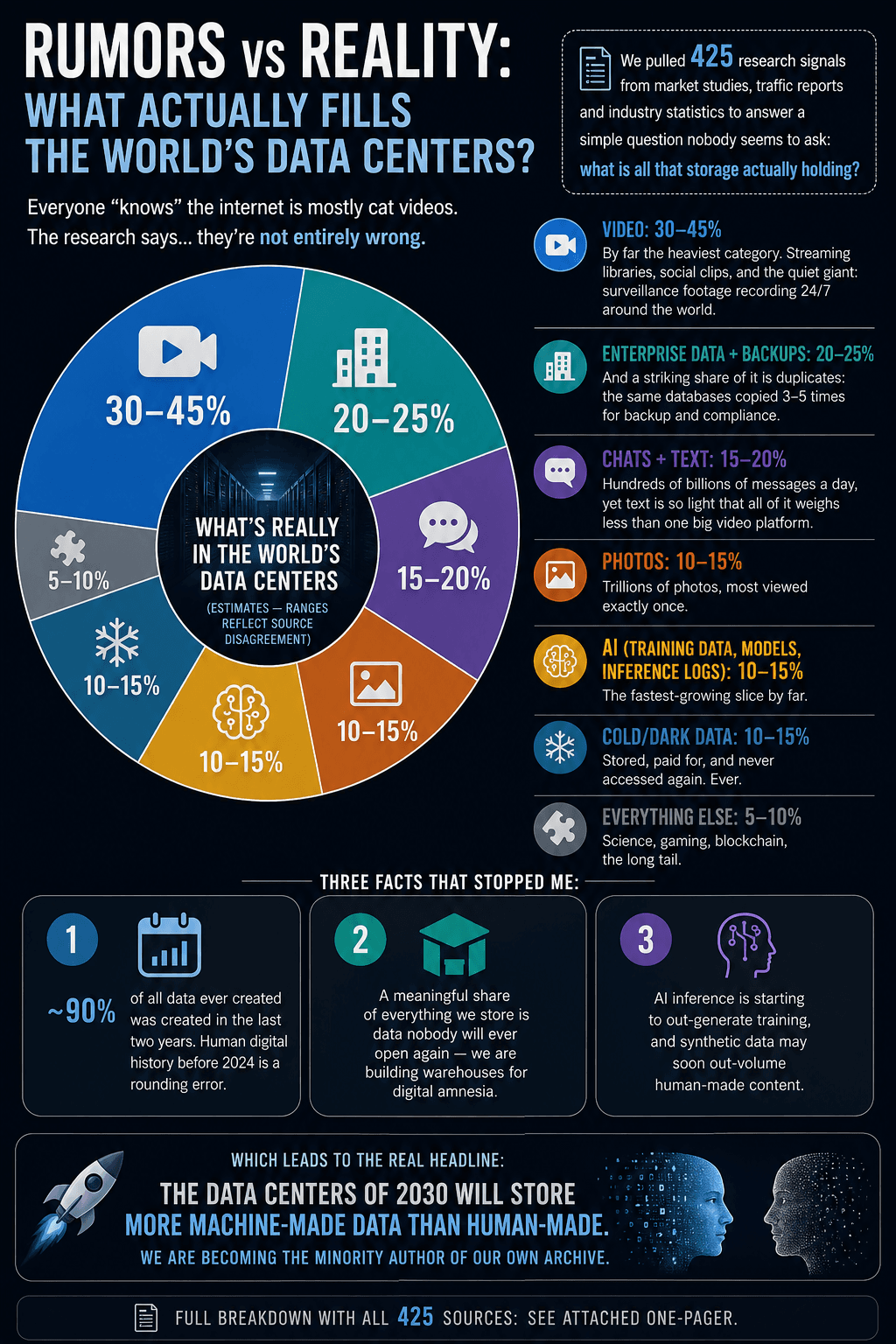
What fills the world's data centers - breakdown of global storage by content type

Key takeaways

  • Video is 30–45% of everything data centers store – streaming libraries, social clips and 24/7 surveillance footage.
  • Enterprise data and backups take 20–25%, and a striking share is duplicates – the same databases copied 3–5 times.
  • AI data (training, models, inference logs) is 10–15% and the fastest-growing slice; cold “dark data” nobody will ever open again is another 10–15%.
  • About 90% of all data ever created was created in the last two years – and by 2030 data centers may store more machine-made than human-made data.

Rumors vs Reality: what actually fills the world’s data centers? 🗄️

Everyone “knows” the internet is mostly cat videos. The research says… they’re not entirely wrong.

We pulled 425 research signals from market studies, traffic reports and industry statistics to answer a simple question nobody seems to ask: what is all that storage actually holding?

Best-evidence breakdown (estimates – ranges reflect source disagreement):

📹 Video: 30–45% – by far the heaviest category. Streaming libraries, social clips, and the quiet giant: surveillance footage recording 24/7 around the world.
🏢 Enterprise data + backups: 20–25% – and a striking share of it is duplicates: the same databases copied 3–5 times for backup and compliance.
💬 Chats + text: 15–20% – hundreds of billions of messages a day, yet text is so light that all of it weighs less than one big video platform.
📷 Photos: 10–15% – trillions of photos, most viewed exactly once.
🤖 AI (training data, models, inference logs): 10–15% – the fastest-growing slice by far.
🧊 Cold/dark data: 10–15% – stored, paid for, and never accessed again. Ever.
🧩 Everything else: 5–10% – science, gaming, blockchain, the long tail.

Three facts that stopped me:

1️⃣ ~90% of all data ever created was created in the last two years. Human digital history before 2024 is a rounding error.
2️⃣ A meaningful share of everything we store is data nobody will ever open again – we are building warehouses for digital amnesia.
3️⃣ AI inference is starting to out-generate training, and synthetic data may soon out-volume human-made content.

Which leads to the real headline: the data centers of 2030 will store more machine-made data than human-made. We are becoming the minority author of our own archive.

Full breakdown with all 425 sources in the attached one-pager.

What share surprised you most? 👇

#DataCenters #BigData #AI #TechTrends

https://www.linkedin.com/posts/andrisgailitis_zettabytes-unpacked-the-real-contents-of-ugcPost-7492302135053946880-8U6D/

Related articles:

Europe Is Investing Heavily in AI Infrastructure – But There’s an Uncomfortable Gap We Don’t Talk About Enough

EU funding for GPU clusters, supercomputers, data centers and AI competence centers

Key takeaways

  • EU funding for AI infrastructure (GPU clusters, supercomputers, data centers) is mostly CAPEX – the real long-term challenge is OPEX: electricity, cooling, engineers and upgrades.
  • Funding typically covers 2–5 year projects; afterwards either state budgets absorb the running costs or the infrastructure must become commercially viable.
  • Without sustainable operating models and an energy strategy, Europe risks building infrastructure that is underutilized, uncompetitive or financially unsustainable.
  • AI sovereignty requires funding outcomes, not just assets.

Across the EU, governments (with support from the European Commission) are funding GPU clusters, supercomputers, data centers and AI competence centers. This is great – and necessary. But most of this funding is CAPEX (buying and building the infrastructure).

The real challenge? OPEX. Running AI at scale means:

  • ⚡ Massive electricity consumption
  • ❄️ Cooling and data center operations
  • 👨‍💻 Skilled engineers and ongoing maintenance
  • 🔄 Continuous hardware and software upgrades

And unlike the initial investment, these costs don’t go away.

In many cases, funding covers 2–5 year projects. After that:

  • Either the state budget absorbs the cost
  • Or the infrastructure must become commercially viable

That’s where things get tricky. Because AI today is not cheap:

  • Training models can cost millions
  • Even inference (serving models) requires constant GPU usage
  • Energy prices in Europe make everything more expensive

The result? We risk building impressive infrastructure that is underutilized, not globally competitive, or financially unsustainable long-term.

This isn’t a criticism – it’s a structural issue.

If Europe wants to be serious about AI sovereignty, we need to think beyond “building infrastructure” and address:

  • sustainable operating models
  • energy strategy for AI
  • public–private usage frameworks
  • long-term funding mechanisms

Otherwise, we’re funding assets – but not outcomes.

Curious to hear how others see this: Is Europe underestimating the cost of actually running AI?

#AI #Europe #DataCenters #HPC #Supercomputing #ArtificialIntelligence #DigitalInfrastructure #Energy #Innovation #TechPolicy #AIStrategy #capex #opex

https://www.linkedin.com/pulse/europe-investing-heavily-ai-infrastructure-theres-gap-gailitis-z4sbf

Related articles:

I Ran the Numbers: If You Filled a 1MW Data Center With iPhones – Here’s the Theoretical Compute Power You’d Get

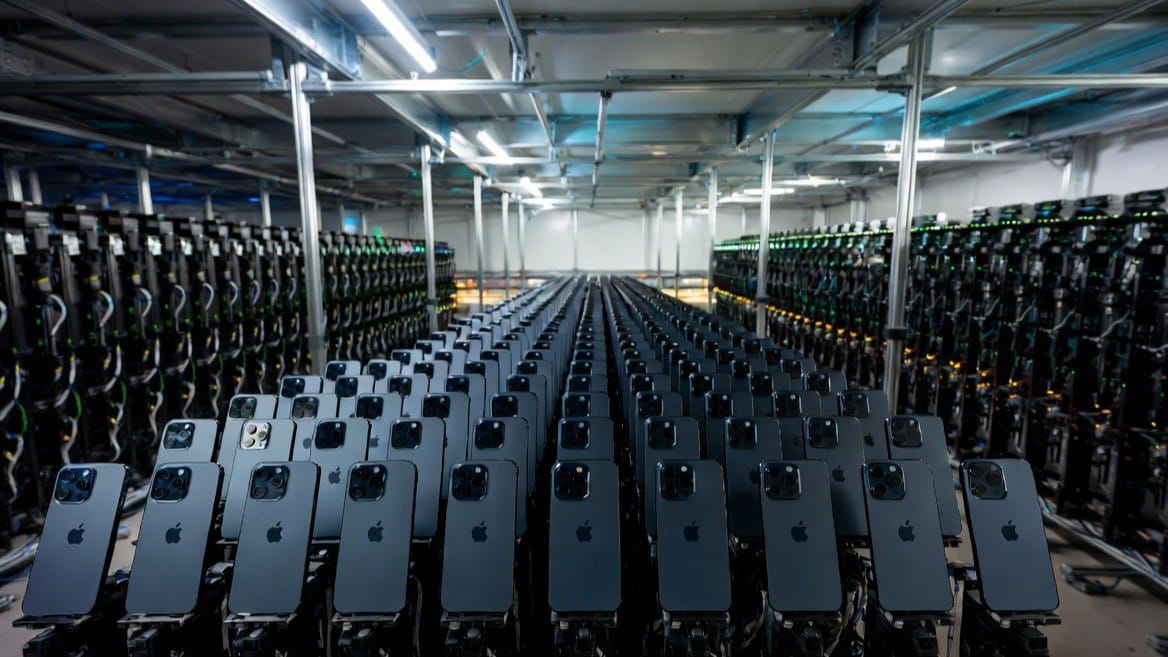
Server racks filled with iPhones in a 1MW data center thought experiment

Key takeaways

  • A 1MW data center could power about 250,000 iPhone 16 Pro Max units (~4W each under sustained load).
  • On paper that is ~1 ExaFLOP of FP32 GPU compute – exascale territory, rivaling the Frontier supercomputer.
  • Mobile chips are ~10x more power-efficient than data-center GPUs (~1 TFLOPS/W vs ~0.1 TFLOPS/W for an NVIDIA H100).
  • Reality check: thermal throttling, interconnect bandwidth and sustained-load limits make this a thought experiment, not a build plan.

Great thought experiment! Let me work through this. The newest iPhone is the iPhone 16 Pro Max (A18 Pro chip, released Sept 2024).

How many iPhones? Under sustained heavy computational load, an iPhone 16 Pro Max draws roughly ~4 watts. That means 1,000,000W ÷ 4W = ~250,000 iPhones.

The A18 Pro chip has three compute engines.

GPU – ~4 TFLOPS (FP32) per device. 250,000 × 4 TFLOPS = 1 ExaFLOP – that’s exascale territory, matching the world’s most powerful supercomputers.

Neural Engine – 35 TOPS (INT8) per device. 250,000 × 35 TOPS = 8.75 PetaOPS for AI/ML inference workloads.

CPU – ~0.6 TFLOPS per device. 250,000 × 0.6 TFLOPS = ~150 PetaFLOPS.

Efficiency is actually impressive. The A18 Pro delivers roughly ~1 TFLOPS/W (GPU), while a data center-grade NVIDIA H100 GPU delivers ~0.1 TFLOPS/W (FP32). Mobile chips are extraordinarily power-efficient by comparison – they just can’t run continuously at peak without throttling.

Physical reality check: each iPhone 16 Pro Max is about 163 × 78 × 8.3 mm. 250,000 of them occupy roughly 26 cubic meters – filling only about 18 standard server racks physically, though cooling all those densely packed devices would be an engineering nightmare.

MetricValue
iPhones needed~250,000
GPU compute~1 ExaFLOP (FP32)
AI inference~8.75 PetaOPS (INT8)
Physical volume~26 m³ (~18 racks)
Cost (at ~$1,200/unit)~$300 million

The compute number is genuinely staggering – on paper it rivals Frontier, the world’s first exascale supercomputer – but of course real-world use would be limited by thermal throttling, interconnect bandwidth, and the fact that iPhones aren’t designed for sustained 100% load.

#DataCenters #AIInfrastructure #Compute #iPhone #HPC #EnergyEfficiency

https://www.linkedin.com/pulse/i-ran-numbers-you-filled-1mw-data-center-iphones-heres-gailitis-0rvtc

Related articles:

The future of AI computing is blasting off into orbit!

The current image has no alternative text. The file name is: Screenshot-2025-12-13-at-11.23.49.png

Key takeaways

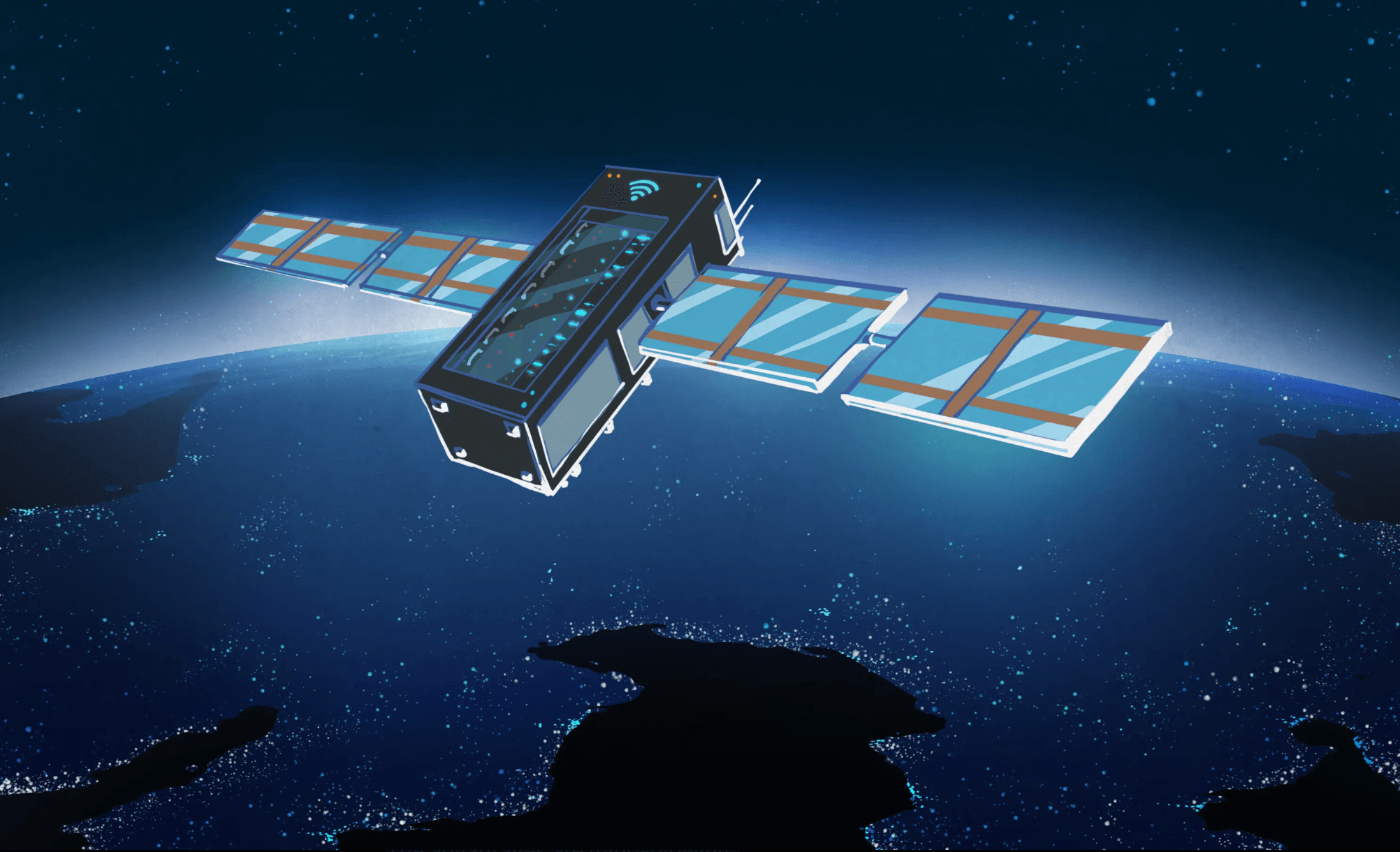
  • In November 2025, Starcloud-1 trained AI models in orbit on an NVIDIA H100 – the first AI model training in space.
  • Orbital data centers promise near-constant solar power (up to 8x more effective than ground panels), zero water cooling and unlimited scalability.
  • Starcloud, Aetherflux, SpaceX, Blue Origin, Google and Europe’s ASCEND project are all racing toward orbital compute.
  • Main challenges – deployable radiators, radiation hardening, latency and launch costs – are falling fast.

As explosive AI growth pushes terrestrial data centers to their limits – devouring massive electricity, guzzling billions of gallons of water for cooling, facing land shortages, permitting delays, and grid overloads – a revolutionary alternative is emerging: orbital data centers.What once sounded like pure sci-fi is now reality. Just last month (November 2025), Nvidia-backed startup Starcloud (formerly Lumen Orbit) launched Starcloud-1, a compact satellite carrying a full Nvidia H100 GPU – 100x more powerful than any prior space compute hardware.And it worked spectacularly: In orbit, they successfully trained and ran multiple AI models, including Andrej Karpathy’s NanoGPT on the complete works of Shakespeare, and Google’s open-source Gemma LLM. This marks the first-ever AI model training in space, proving data-center-class GPUs can thrive in orbit.The advantages are mind-blowing:

  • Near-constant solar power: In optimized sun-synchronous orbits, satellites get up to 8x more effective energy than ground panels, with no night cycles or weather interruptions.
  • Zero water cooling: Waste heat radiates directly into the cold vacuum of space – no evaporation towers, no freshwater strain.
  • Unlimited scalability: No land acquisition, no local opposition, no grid upgrades needed.
  • Potentially 10x lower long-term costs: Even factoring launches, abundant clean energy and passive cooling slash operational expenses.
  • Sustainability boost: Orbital facilities could dramatically cut AI’s carbon footprint while preserving Earth’s precious resources.

The momentum is unstoppable. Major players are racing ahead:

  • Starcloud plans clusters with multiple H100s and Nvidia’s next-gen Blackwell GPUs in 2026–2027, targeting commercial workloads like satellite imagery inference for disaster response.
  • Aetherflux unveiled “Galactic Brain” – aiming for the first commercial orbital AI node in Q1 2027, leveraging space solar for unrestricted compute.
  • SpaceX (via Elon Musk) is adapting high-power Starlink V3 satellites for AI processing, with massive deployment potential via Starship.
  • Blue Origin has been quietly developing orbital data center tech for over a year.
  • Google’s Project Suncatcher explores solar-powered AI satellite constellations.
  • Axiom Space launching orbital data nodes soon.
  • Europe’s ASCEND project (led by Thales Alenia Space) confirmed feasibility for gigawatt-scale by mid-century.

Of course, real engineering challenges exist. Cooling dense racks demands large deployable radiators (governed by Stefan-Boltzmann radiation physics), radiation hardening for reliable operation, occasional latency for ground links, and upfront launch costs. But plummeting reusable rocket prices (thanks to Starship), innovative lightweight radiators, and proven demos like Starcloud-1 are rapidly closing those gaps.We’re witnessing the dawn of a new era: Abundant, green, scalable compute powering the AI revolution without burdening our planet. Orbital data centers aren’t just hype – they’re the sustainable path forward.What excites you most about this frontier? Will space host the world’s largest AI factories by 2040? Drop your thoughts below!

Subscribe & Share now if you are building, operating, and investing in the digital infrastructure of tomorrow.

#AI #SpaceTech #Innovation #ArtificialIntelligence #Sustainability #FutureOfComputing #OrbitalDataCenters #SpaceAI #AIRevolution #SustainableTech #TechInnovation #DeepTech

https://www.linkedin.com/pulse/future-ai-computing-blasting-off-orbit-andris-gailitis-c2ewf

Related articles:

When Energy-Saving Climate Control Puts Drivers to Sleep: The Hidden CO₂ Problem in Modern Cars

EV car
Eletric car
Green car

Key takeaways

  • CO₂ buildup in car cabins – often caused by automatic HVAC recirculation – causes drowsiness: with four occupants, levels can reach 2,500 ppm within five minutes.
  • Outdoors CO₂ is about 420 ppm; above 1,500–2,000 ppm most people feel distinctly heavy-eyed. This is a road safety issue, not just comfort.
  • Modern cars flip into recirculation automatically to save energy, often without any clear dashboard indicator.
  • Awareness is near zero on mainstream driver forums; only niche EV and RV communities discuss cabin CO₂.

A few weeks ago, a Latvian TV segment by journalist Pauls Timrots caught my attention. He talked about that strange heaviness drivers sometimes feel on long trips — not quite fatigue, not quite boredom, but a foggy drowsiness that creeps in, especially at night or in stop-and-go traffic.

What struck me is that most people know the feeling but don’t have a name for it. We assume it’s just “tiredness.” Yet the culprit, in many cases, is something more invisible: carbon dioxide (CO₂) buildup inside the cabin.

I first learned about this years ago in tropical cities, where taxis often ran their air conditioning permanently in recirculation mode. With the fresh-air intake closed and windows up, CO₂ levels in those cabs would climb to levels I’d normally only expect in a packed lecture hall with no ventilation. I once measured 5,000 ppm in a taxi — a concentration known to cause drowsiness, headaches, and sluggish thinking.

Show the driver the “fresh air” button, and within minutes the numbers fell, along with the yawns.

Fast forward to today. The difference is that the “driver” making that decision in your car is often not you — it’s the HVAC algorithm. To save energy, modern cars (whether ICE, hybrid, or EV) lean heavily on recirculation. Some models even flip into recirc automatically, without a clear dashboard indicator, sometimes even in manual climate mode. Unless you’re carrying a CO₂ sensor (like an Aranet), you may never know why you suddenly feel like nodding off.


What the Science Shows

Outdoors, CO₂ sits at about 420 ppm. Most building standards aim to keep indoor levels below 1,000 ppm, because research links higher levels to impaired concentration and increased fatigue. By 1,500–2,000 ppm, many people feel distinctly heavy-eyed.

And in cars? Levels climb shockingly fast. One Swedish study found that with four people in a closed cabin, CO₂ reached 2,500 ppm within five minutes — and 6,000 ppm within 20 minutes — even with some ventilation. In real-world driving tests, single-occupant vehicles often cross 1,500 ppm in less than half an hour when the HVAC is favoring recirculation.

That’s not just an air quality number. That’s a road safety issue.


What AI Tools Reveal About Awareness

I ran this topic through a few AI-powered trend analysis tools and forum scans, and the pattern was striking:

  • On mainstream driver forums, there’s almost zero discussion of CO₂. People talk about foggy glass, stale air, or “feeling tired,” but rarely connect it to cabin CO₂.
  • In niche communities — Tesla owners, Rivian forums, overlanders, and RV groups — the conversation is growing. These are the people who buy CO₂ meters and post screenshots of 2,000+ ppm.
  • Academic research is solid and ongoing, but mostly locked away in journals. Few car magazines or mainstream outlets ever reference it.
  • Automakers? Silent. Some premium brands include CO₂ sensors, but they’re marketed as “air quality features” (to block pollution), not as safety tools.

What AI essentially shows is a disconnect: the science is mature, the user experience is common, but the public conversation is minimal.


Practical Fixes for Drivers

The good news is that once you know what’s happening, it’s not hard to fix:

  • Prefer fresh air over recirculation when cruising.
  • If your car insists on switching back to recirc, try toggling it off manually (some Toyotas respond to this reset trick).
  • In stubborn systems, crack the window 1–2 cm. Noisy, yes. Effective, absolutely.
  • Keep your cabin filter clean — a clogged filter nudges the HVAC to favor recirc.
  • Consider carrying a small CO₂ meter. Once you’ve seen a cabin climb past 1,500 ppm, you’ll never unsee it.

For Automakers and Fleets

This is an easy win for safety and trust.

  • Show recirculation state clearly in the UI. Don’t override it without a visible cue.
  • Add a basic CO₂ sensor and bias toward fresh air when levels rise.
  • Offer a persistent “Fresh Air Priority” setting.
  • For fleets: train drivers to recognize drowsiness linked to air quality, not just lack of sleep.

Why It Matters

Older cars did what you told them: fan on, recirc off, end of story. Newer vehicles are smarter, but their logic is mostly about efficiency and temperature comfort — not human alertness. Energy savings are important. But alert drivers are non-negotiable.

This is one of those invisible safety issues that deserves daylight. Just as we take seat belts, ABS, and air filters for granted, we should start treating fresh air as a core safety feature, not a luxury setting.

Until then, the responsibility is on us as drivers: know the signs, press the button, crack the window.

Because the next time you feel a wave of unexplained drowsiness behind the wheel, it may not be your body telling you to sleep. It may just be the air you’re breathing.


Curious to hear from others: Have you ever noticed this effect? Have you measured CO₂ in your car? And should automakers be more transparent about it?

Subscribe & Share now if you are building, operating, and investing in the digital infrastructure of tomorrow.

#RoadSafety #DriverSafety #AutomotiveInnovation #VehicleSafety #AirQuality #CarbonDioxide #CabinAir #HealthAndSafety #HumanFactors #TransportationSafety #FutureOfMobility #SustainableTransport #SmartCars #ConnectedCars #AutomotiveEngineering #ArtificialIntelligence #AIInsights #DataDriven #SafetyFirst #LinkedInThoughtLeadership

https://www.linkedin.com/pulse/when-energy-saving-climate-control-puts-drivers-sleep-andris-gailitis-4rlif

Related articles:

AI Inside AI: How Data Centers Can Use AI to Run AI Workloads Better

AI Inside AI: How Data Centers Can Use AI to Run AI Workloads Better

Key takeaways

  • AI can run the AI data center: instant temperature and airflow forecasting, predictive maintenance from sensor data, and energy-aware scheduling of training jobs.
  • Real-time monitoring of PUE, WUE and carbon intensity turns efficiency into an operational discipline.
  • AI also covers security anomaly detection, GPU health forecasting, incident “fire drills” and automated compliance reporting.
  • If you host AI workloads, your operations should be AI-driven too – a necessity, not a choice.

This is a high-stakes AI workload host challenge—the machinery has a dense GPU cluster but also hard-to-predict demand and extreme cooling demands. However, the same technology pushing this sort of workload in the future will also help the center run more smoothly, safely, and environmentally friendly.

How to use AI to manage the AI data center in 10 steps:

1. AI models instantly forecast temperature changes. These models can render instant forecasts of airflow patterns to compensate for hot areas by, for example, fitting a contained LC unit that translates recycling air with an independent refrigeration system into cooling power delivered directly on top of electronic parts needing it.

2. Use vibration, power draw, and sensor data from chillers, UPSes, and PDUs to target those pieces of equipment that are likely to break long before they do.

3. Energy-Aware Scheduler for AI Training Jobs. Run the workloads at times when there is a cleaner grid and send those on out to areas with more wind turbines.

4. Optimizing Scheduling of AI Workloads. Spreading GPU-heavy jobs across clusters in order to even out the load saves one region from overloading while others wait.

5. Real-time Adaptive Efficiency Monitoring constantly observes PUE, WUE, and Carbon intensity with real-time recommendations to operations—if everything looks efficient, let’s not get hasty and take a risk that could put us out of business.

6. Building-Intelligence Video-Surveillance Security Anomaly Detection. Scans access logs, security cameras, and network traffic for signs of someone trying to break in.

7. Feature: GPU/TPU Hardware-Health Forecasting. Identifies symptoms of degeneration—error rates increasing, components overheating or running slow—for replacement before training jobs fail entirely.

8. Incident simulation and response planning. Running digital “fire drills” to see what the plant would do when: cooling failed, power was lost, or if there were a cyber attack.

9. Real-time automated compliance reporting ISO, SOC, etc. Using the operational logs of the facility to onboard customers faster. Pulls from system/operational logs for audit reports on-demand (reliable and consistent & audit-ready).

10. Automated GPU node on/off with Intelligent Resource Scaling. It won’t turn on GPU nodes just because you’re using them, it will also try to keep energy costs down through effective management.

In the end, if you have an AI host, then your business should be AI-driven too. It is not a matter of choice, but of necessity in order to deal with the scale and complexity of these modern AI workloads, that we begin using machine intelligence for both heating control and cooling spot-by-spot because it simply has become routine everywhere else.

Subscribe & Share now if you are building, operating, and investing in the digital infrastructure of tomorrow.

#DataCenter #CloudComputing #HostingSolutions #GreenTech #SustainableHosting #AI #ArtificialIntelligence #EcoFriendly #RenewableEnergy #DataStorage #TechForGood #SmartInfrastructure #DigitalTransformation #CloudHosting #GreenDataCenter #EnergyEfficiency #FutureOfTech #Innovation #TechSustainability #AIForGood

https://www.linkedin.com/pulse/ai-inside-how-data-centers-can-use-run-workloads-better-gailitis-1hjzf

Related articles:

AI’s Double-Edged Sword in Software Development: From Speed to Security Risk

AI’s Double-Edged Sword in Software Development: From Speed to Security Risk

Key takeaways

  • AI coding assistants replicate what they learned from public repositories: known vulnerabilities, outdated dependencies and insecure defaults.
  • AI speeds up insecure coding just as fast as secure coding – a dangerous multiplier.
  • The fix is also AI: real-time code scanning, dependency checks, secure refactoring and generated security tests.
  • Forward-looking teams run an “AI + AI” model – one AI writes the code, another continuously audits and hardens it.

AI-powered coding assistants have changed how software is built. They autocomplete functions, generate boilerplate code in seconds, and even write entire modules on demand. For teams under pressure to ship faster, this feels like magic.

But there’s a catch — and it’s one that’s quietly worrying security teams everywhere.


When AI Writes Code, Where Does It Come From?

Generative AI tools are trained on massive datasets, often including open-source repositories from GitHub and other public sources. That means:

  • Code reuse happens without attribution or vetting
  • Security vulnerabilities in source code can be unknowingly replicated
  • Licensing issues can creep in without detection

In practice, AI can “suggest” a snippet that looks perfect, compiles cleanly, and passes the tests — yet still carries a known vulnerability or outdated dependency.


The New Attack Surface

The risk isn’t just theoretical. We’re already seeing patterns emerge:

  • Vulnerable Dependencies – AI might import an old library version with known CVEs (Common Vulnerabilities and Exposures) because it was present in its training set.
  • Insecure Defaults – Code generation often prefers simplicity over security (e.g., weak crypto, unsanitized inputs, hard-coded credentials).
  • Logic Oversights – AI tools may produce “functionally correct” code that is security-poor, especially if the user’s prompt doesn’t explicitly demand secure patterns.

In effect, AI can speed up insecure coding just as fast as it speeds up secure coding — and in many organizations, that’s a dangerous multiplier.


AI to the Rescue?

Here’s the twist: the same technology introducing the risk is also becoming the most effective way to detect and mitigate it. AI-powered security tools can:

  • Scan Code in Real Time – Detect vulnerable patterns, weak encryption, and unsafe functions as the developer writes.
  • Check Dependencies – Automatically compare imported libraries against vulnerability databases and suggest patched versions.
  • Automate Secure Refactoring – Rewrite unsafe code segments using current best practices without breaking functionality.
  • Generate Test Cases – Build security-focused unit and integration tests to validate that fixes work.

The Emerging AI Security Workflow

Forward-looking dev teams are already shifting to a “AI + AI” model — AI accelerates development, and another AI layer continuously audits and hardens the output.

A secure AI coding pipeline might look like this:

  1. Code Generation – AI assists with writing new functions or integrating external modules.
  2. Automated Security Scan – A security-focused AI reviews code for known vulnerabilities, insecure patterns, and compliance gaps.
  3. Dependency Check – Libraries are matched against CVE databases in real time.
  4. Auto-Remediation – Vulnerable or risky code is refactored on the spot.
  5. Continuous Monitoring – New commits are scanned for security regressions before merging.

Why This Will Matter More in 2025 and Beyond

Several factors are going to make this a hot topic very soon:

  • Regulatory Push – Governments are beginning to require secure-by-design practices, especially for software in critical infrastructure.
  • AI Code Volume – As more code is AI-generated, the “unknown risk” portion of software stacks will grow.
  • Attack Automation – Adversaries are also using AI to find and exploit vulnerabilities faster than before.

We’re heading toward a future where AI-assisted development without AI-assisted security will be seen as reckless.


Best Practices Right Now

  1. Always Pair AI Coding Tools with AI Security Tools – Code generation without security scanning is a recipe for trouble.
  2. Maintain a Live SBOM (Software Bill of Materials) – Track every dependency, where it came from, and its security status.
  3. Train Developers on Secure Prompting – The quality and security of AI-generated code depends heavily on the clarity of your prompt.
  4. Use Isolated Sandboxes – Test AI-generated code in controlled environments before integrating into production.
  5. Monitor for Vulnerabilities Post-Deployment – New exploits are found daily; continuous scanning is essential.

Bottom line: AI in programming is like adding a rocket booster to your software team — but if you don’t build a heat shield, you’ll burn up on reentry. The future of safe software development won’t be “AI vs. AI” — it’ll be AI working alongside AI to deliver both speed and security.

Subscribe & Share now if you are building, operating, and investing in the digital infrastructure of tomorrow.

#AIcoding #AISecurity #SecureDev #GenerativeAI #CyberSecurity #AItools #DevSecOps #AIcode #AIrisks #SoftwareSecurity #AIDevelopment #AIvulnerability #AIinfrastructure #AIsafety #AIforDevelopers

https://www.linkedin.com/pulse/ais-double-edged-sword-software-development-from-speed-gailitis-fs5af

Related articles:

Beyond Uptime

Beyond uptime - liquid cooling hardware in an AI-ready data center

Key takeaways

  • AI training racks pull 30–80 kW – 5–10x more than the 3–10 kW enterprise racks most pre-2018 facilities were built for.
  • GPU clusters can jump from idle to full draw in a second, stressing both power and cooling systems.
  • Legacy air cooling, UPS and switchgear face hard physical limits with 40+ kW racks.
  • The survivors will not be the newest buildings but the best retrofits: hybrid cooling, modular AI pods and targeted power upgrades.

Can Yesterday’s Data Centers Handle Tomorrow’s AI?

Industry-wide, thousands of megawatts are hostage to data centers that were limiting AI lifecycles before this technology boom. Some are already constructed, some in the middle of construction — all tailored to dirty workloads that still, for most people (until recently), would have looked nothing like today’s GPU-rich cluster.

With the prevalence of high-density AI workloads, hybrid cooling requirements, and one-minute deployment cycles to keep data centers competitive in an AI-driven world, the question becomes extremely relevant.

1. The AI Workload Shift

Artificial Intelligence is changing the rules of infrastructure.

  • At the bottom, we have training clusters — One AI training rack can pull 30–80 KW, which is 5x-10x higher than a traditional enterprise rack.
  • Inference workloads — Not so centralized, but still push physical cooling and networking beyond the realm of legacy architectures.
  • Dynamic loads — GPU clusters can go from idle to full draw in a second, which both stresses power and cooling systems.

For many facilities, this isn’t a “nice to have” upgrade — it’s an existential need to adapt and compete with the next generation of patrons.

2. Limits of Traditional Design

The majority of pre-AI data centers (ones built before 2018, if we were to define it very strictly) were constructed for racks in the 3–10 kW per rack range cooled by air.

  • Cooling: CRAC/CRAH units and hot aisle containment — were not designed for 40+ kW racks.
  • Change-out of UPS, PDUs, and Switchgear sized for lower densities [Selective or Full Replacement]
  • Some unique to the application — 5 kW racks respond better to larger f/r ratios, the circumstances leading up to a raised floor collapse or a rack tipping over because it was back heavy than others (aka top or bottom heavy).

Here though, some facilities are really going to be able to adapt while others may hit hard physical limits that will limit their AI-readiness.

3. Adaptation Strategies

The operators who survive won’t necessarily be the ones with the newest buildings — but those whose retrofits well.

  • A combination of air cooling (for standard workloads) with direct-to-chip liquid cooling or rear-door heat exchangers for AI racks as hybrid cooling models.
  • Modular AI Temps — High-density AI in the rest of the data center once special halls or pods are converted to deter high heat output AI.
  • Point solutions for Power — Enhancing few electric runs to sustain AI loads without turning the facility upside down.
  • Network design — High throughput but best in class low latency interconnects between GPU nodes guaranteeing optimal operation of the cluster.

And Hybridization escapes the ‘all-or-nothing’ syndrome, enabling facilities to tap into AI demand but not at the expense of their current customer base.

4. The Retrofit ROI Question

As a result, not all data centers would — or should — be AI ready.

Retrofitting high-density zones is capex-heavy:

  • That should be up in the millions when it comes to power upgrades.
  • Installing liquid cooling systems requires mechanical, plumbing, and floorplan changes.
  • Network upgrades add further cost.

Workload demand, competitive landscape, and the lifespan of the existing facility constitute your decision point.

In those situations, it may be more cost-effective to create a greenfield site in close proximity to the existing building and visit for scheduled maintenance only rather than investing capital in deep retrofits.

5. The Strategic Outlook

This is the dawn of AI infrastructure expansion. Three likely scenarios are emerging:

  • Traditional racks blended with AI-ready pods: Dual-use facilities
  • Artificial intelligence-specific buildings with layer upon layer of extreme density and liquid cooling built from scratch.
  • AI/ML ‘clusters — rather than metro density, these will concentrate compute closer to large power-rich, low-latency markets.

The AI era doesn’t plan for the next 20-year build cycle. Those operators who change now with clear retrofit strategies in place will secure the first-mover advantage on the next wave of customers.

Closing Thoughts

Actually, running AI is not just “another workload.” It is a completely different thermal, power, and interconnect problem. The form and function of yesterday can meet the AI needs of tomorrow — but only if operators take a targeted, rational, and accelerated approach to redesign.

Subscribe & Share now if you are building, operating, and investing in the digital infrastructure of tomorrow.

AI #DataCenters #AIInfrastructure #HighDensityComputing #HybridCooling #LiquidCooling #GPUClusters #CloudComputing #DataCenterRetrofit #EdgeComputing #DigitalInfrastructure #Colocation #AIThermalManagement #PowerUpgrades #NextGenDataCenters

https://www.linkedin.com/pulse/beyond-uptime-andris-gailitis-hiovf

Related articles:

Proudly powered by WordPress | Theme: Baskerville 2 by Anders Noren.

Up ↑